This has been a great break. It was wonderful being able to chat with family and friends, many of whom I haven't seen in ages. Now I have to buckle down and prepare some lesson plans get ready for the upcoming semester. I could sit down create new and (hopefully) impactful lessons all on my own or I could start socializing and let my online community help me out.
Socializing professionally is not like chatting with folks over the holidays. The goal here is to decrease work wile at the same time increasing student performance. Here are some tips on how to use the online community to reduce your workload and improve your teaching. There are three main ways to go social on the internet. First, you can get in with a group and just wait to see what goodies show up. That's what most teachers do. Second, you could interact with some of the people in your group by answering some questions or making a comment here or there. The third and most time consuming activity is to actually share some of your ideas, ask some questions or publish some lesson plans.
Consuming content
Like I said earlier, the majority of us use the internet as a sort of treasure box filled with goodies. We go in, find some wonderful ideas for a class we're doing and move on to our grading or call some parents. I personally like to get ideas over email. As a member of NSTA, I get to be on a listserve for biology, chemistry and technology teachers. For anyone not familier with the term, a listserve is an email service which lets you send and receive email to and from a group. I never read new emails. Instead, I treat it as an idea bank. When I need a new idea for an upcoming lesson, I go into the folder I've stored them in and just perform a key word search.
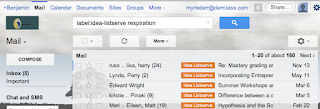 |
| Using Gmail, I can easily find what I need. |
For example, when I would need advice on how to teach respiration, I'd go to that folder and search for all emails containing the word "respiration". I'd always find some great advice or a worksheet someone was willing to share. Since it all came from teachers who actually used the material in the classroom, I could have confidence in the material.
Reacting to content
The next most common way teachers use the internet is to interact with others online. This means going to sites to get the answer to a question you have or perhaps to comment on what someone has written in a blog or post. These sorts of sites about and include
Yahoo Answers,
Linkedin, or one of the many other sites
found here. Perhaps my favorite place to interact with teachers is
Edumodo.
This is a free, secure online social network designed to look and feel just like Facebook. However, it has several security features built in to make it teacher and student friendly. For example, the site does not have the ability for students to communicate with the outside world (except for their own parents). Instead, they can only hear from and write to their teacher and classmates. Really the only people interested in joining Edmodo are teachers and their students. That makes this site the perfect place to go when you have a burning question or an issue you'd like some advice on. Oh ya, did I mention you don't HAVE to put in your actual name? Use a pseudonym if you want some extra privacy and don't plan on using it for your students.
Creating content
By far the most rewarding thing that you can do online is create content. This means publishing your ideas, writing articles and advising other teachers. Of course, this is going to be the most time consuming and will require far more effort on your part. The benefits are huge, though. Giving over your ideas will tend to prompt others to give you their stuff. It becomes a virtuous circle. If you are going to be sharing your ideas, I would use
Blogger,
Diigo or
Edmodo.
 | I've already spoken about Edmodo. Diigo is a social bookmarking site, allowing you to save and share websites you find interesting with groups of people. Blogger is, of course, where you can set up and write a blog. Any of these would be a fine choice. Really, whether you are just looking in and getting good ideas or helping others get advice for their classroom, try going social this year. You wont regret it. |
Really, whether you're just looking in and getting good ideas or helping others get advice for their own classroom, try going social this semester. You'll love the results!