Showing posts with label blog resources. Show all posts

1/09/2013

Blogger plus Drive = Awesome


One of the great things about Google is that it uses largely the same platform for all of it’s services (Drive, Sites and Blogger). That means that you can use one service to create your content and publish it using the other service. I’ve mentioned this before here, but I thought it was worth mentioning again.
This post was not written in Blogger, but in Google Drive where I compose all of my posts. When I’m finished, all I need to do is copy and paste everything into Blogger and hit publish. The big advantage here are the editing tools that Google provides for you in Drive that are missing in Blogger. Specifically, I can add tables, move text around easily, change line spacing and format my document in ways that I wouldn’t otherwise be able to do. Google drive also makes working with images a breeze.
If you’ve been using Blogger for a while and would really like to have more functionality, try creating your work in Google Drive and just using Blogger as a publisher. I think you’ll be really pleased.

3/28/2012

Space for learning

One of the great things about word processors is the ability to manipulate documents in any way you see fit. Whichever program you use, you should be aware of the importance of blank space. Emptiness is not the same thing as "nothing". If you're purposeful about the way you use emptiness, it will work to promote learning in your students. Here are several ways blank space can help your students in the learning process.

1) Chunking information-
Emptiness takes up real estate which means less information can fit on a single page. You’ll be forced to put only the most important items there.  A handout ought to contain all the relevant material for a lesson and leave out all the fluff. This way, students can focus more easily on what matters.

2) Focus-
Blank space will guide students’ eyes to the right spot. Too many items on a sheet of paper confuses the reader. Grouping pictures and text boxes to one side not only makes your handout visually appealing, but also provides space for students to write in.

3) Note space-
As I just mentioned, kids need a place to write down important information. As you know, actively engaging with a handout is going to lead to greater understanding and retention than passively reading it. Emptiness also provides the space to jot down clarifications and questions they may have.

4) Interest-
Beauty isn’t your first aim. However, if something is more appealing, it becomes more interesting which in turn makes material more memorable. That in turn improves learning. Consider using white space to add asymmetry, depth and perspective to your materials.

The old adage that “less is more” still holds true. Try to include a bit more white space in your handouts and see what the results are. Please let me know if you see any improvements!


1/02/2012

On Tradition

We do what we have always done because it works. And hey, why reinvent the wheel? Besides, we have so many things we have to get done that it's hard to find time to learn a new way of doing things. The thing is, it turns out that our ways are often inefficient or less productive than some alternatives.

With a new semester upon us, it may be time to try a few new tools. Below, I list some of my favorite online tools to improve teaching in the next 18 weeks. Give them a try. You may find yourself getting more done in less time, for free.

Google docs + Google calendars
I've written about this mash-up before. Google calendars is an easy to use schedule that you can work on at any time and on any computer that's handy. Calendars also has a nice feature that allows you to attach any file to an event as long as it is already in your Google docs account. That opens up the possibility of attaching lesson plans, tests and student samples. Since you can make any of those files private, you never have to worry about anyone else in the world seeing sensitive documents.

Edmodo
Students love social media for good reasons; it's fun, engaging and it makes learning easier. Unfortunately, there are so many dangers and pitfalls to using sites like Facebook or Twitter. The solution is a site designed specifically for educators to communicate with their students. Parents have full access to their own student's activities and teachers moderate all discussions. There is no outside communication and students don't have the option to talk to the outside world. Better yet, you can make self-grading quizzes and polls for free!


Desmos Graphing Calculator
Students are given all sorts of wonderful technology in schools. They are still being asked to buy expensive calculators. Finally here is a free online solution. Help kids learn to do math without expecting them to buy equipment.

Prezi
Perspective matters. Much of what we talk about in class deals with large scale vs. small scale. Consider these questions: What does a water molecule have to do with whether you have a desert or grassland? How did the Delaware river affect George Washington? What does the hight of a tree and the length of it's shadow have to do with a protractor you hold in your hand?
Prezi is an online presentation site that creates unique, beautiful presentations. Kids love them!

Educational Youtube
Finally! A way to get good educational videos at school! You don't have to worry about crude jokes or wardrobe malfunctions. Its all good stuff here. Well, that's mostly true. Unfortunately, suggestive videos are still sometimes suggested on the right hand side of the screen. You can't watch them, but the suggestive picture is there along with the provocative title. You'll just need to be a bit careful even when the video you want to watch is great.


12/29/2011

Socializing productively

This has been a great break. It was wonderful being able to chat with family and friends, many of whom I haven't seen in ages. Now I have to buckle down and prepare some lesson plans get ready for the upcoming semester. I could sit down create new and (hopefully) impactful lessons all on my own or I could start socializing and let my online community help me out.

Socializing professionally is not like chatting with folks over the holidays. The goal here is to decrease work wile at the same time increasing student performance. Here are some tips on how to use the online community to reduce your workload and improve your teaching. There are three main ways to go social on the internet. First, you can get in with a group and just wait to see what goodies show up. That's what most teachers do. Second, you could interact with some of the people in your group by answering some questions or making a comment here or there. The third and most time consuming activity is to actually share some of your ideas, ask some questions or publish some lesson plans.

Consuming content

Like I said earlier, the majority of us use the internet as a sort of treasure box filled with goodies. We go in, find some wonderful ideas for a class we're doing and move on to our grading or call some parents. I personally like to get ideas over email. As a member of NSTA, I get to be on a listserve for biology, chemistry and technology teachers. For anyone not familier with the term, a listserve is an email service which lets you send and receive email to and from a group. I never read new emails. Instead, I treat it as an idea bank. When I need a new idea for an upcoming lesson, I go into the folder I've stored them in and just perform a key word search.  
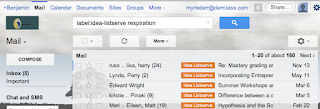
Using Gmail, I can easily find what I need.
For example, when I would need advice on how to teach respiration, I'd go to that folder and search for all emails containing the word "respiration". I'd always find some great advice or a worksheet someone was willing to share. Since it all came from teachers who actually used the material in the classroom, I could have confidence in the material.

Reacting to content

The next most common way teachers use the internet is to interact with others online. This means going to sites to get the answer to a question you have or perhaps to comment on what someone has written in a blog or post. These sorts of sites about and include Yahoo Answers, Linkedin, or one of the many other sites found here. Perhaps my favorite place to interact with teachers is Edumodo.

This is a free, secure online social network designed to look and feel just like Facebook. However, it has several security features built in to make it teacher and student friendly. For example, the site does not have the ability for students to communicate with the outside world (except for their own parents). Instead, they can only hear from and write to their teacher and classmates. Really the only people interested in joining Edmodo are teachers and their students. That makes this site the perfect place to go when you have a burning question or an issue you'd like some advice on. Oh ya, did I mention you don't HAVE to put in your actual name? Use a pseudonym if you want some extra privacy and don't plan on using it for your students.
Creating content

By far the most rewarding thing that you can do online is create content. This means publishing your ideas, writing articles and advising other teachers. Of course, this is going to be the most time consuming and will require far more effort on your part. The benefits are huge, though.  Giving over your ideas will tend to prompt others to give you their stuff. It becomes a virtuous circle. If you are going to be sharing your ideas, I would use Blogger, Diigo or Edmodo.

I've already spoken about Edmodo. Diigo is a social bookmarking site, allowing you to save and share websites you find interesting with groups of people. Blogger is, of course, where you can set up and write a blog. Any of these would be a fine choice. Really, whether you are just looking in and getting good ideas or helping others get advice for their classroom, try going social this year. You wont regret it. 
Really, whether you're just looking in and getting good ideas or helping others get advice for their own classroom, try going social this semester. You'll love the results!