Showing posts with label communication. Show all posts

6/08/2012

Gmail and ESL

Update: Gmail now available in Latin American Spanish
Originally posted by Chris Yang, Product Manager, Translator Toolkit

It has taken Google a surprisingly long time to provide translation services for Latin American Spanish (LAS) emailers. As teachers, we have been working with LAS communities for years and communication between English speaking teachers and non-English speaking parents can be tricky. Now that we can translate our emails into LAS, parent-teacher communication just got easier.

Google hopes that by making Gmail available in many languages, more people will be able to share their culture and knowledge with others worldwide. Spanish is spoken by more than 300 million people in the Americas and the Caribbean. The Latin American Spanish version of Gmail is designed to be a closer match to the expectations of Spanish speakers in the Americas. You can select Latin American Spanish as your default language in Settings:


3/06/2012

Teachers, stay safe.

There has been an awful lot posted online about how to keep students safe on the Internet. However, I haven't run into very much focusing on teacher safety. Perhaps we tend to think that, as adults we're savvy enough to avoid online blunders. I thought that about myself until I started doing some research. The following list is by no means comprehensive, but it's a pretty good starting point. Please keep these tips in mind whenever getting on the Internet.

1) People lie.

Ya, I know this one is pretty obvious. Be honest, though. Have you ever forgotten a key piece of information for your class and needed to look it up really quickly? The shape of a molecule? An important date? The difference between affect and effect? Be especially careful when you’re in a rush!

2) Plagiarism sets a bad example.*

Forget about the legal ramifications of plagiarism. OK … just for a second forget about it. Have you ever gone online looking for a picture to use for your PowerPoint? Ever cite your sources? Have you ever copy and pasted quiz questions you’ve found online without telling your students where you got them? Your students will find out. (Mine did.)

3) If you don’t want it on the Internet, don’t put it on the Internet.
I have no idea who first said this, but it’s brilliant. Here’s the big point: Everything you put online for someone else to see can stay there forever. In spite of “privacy settings” there are hundreds of ways to transfer what you have online to some other computer. Even if you delete it, there’s no way of getting rid of it. Think twice before mentioning your school or colleagues.

4) Set your filter to “safe”.
Its true that you’ll be missing out on some good things if you do this. However, you’ll be saving yourself from all of the problems that surround pulling up an inappropriate website. If a student is exposed to a single inappropriate image, you are setting yourself up for uncomfortable discussions.

5) Students don’t have privacy on school computers.
This is a bit of a strange issue. Many students get offended by a teacher looking over their shoulder to see what they’re up to. Many educators seem to buy into this attitude thinking that students should allowed to work largely unsupervised. When students know they’ll be monitored, they tend to stay on task.

So what do you think? Did I miss anything? Do you disagree with anything I’ve written here?


*Thanks to Deb Ng inspiring much of this blog post.

2/28/2012

Classroom communications and the computer

We're in the communications business. We need to get our lesson across to kids, let our administrators know how well we're doing in the classroom and help parents understand how to help their child succeed in academia. As in all other communication fields, there are 4 primary ways we get information across. Each of these is important and each can be improved by technology.


1) Electronic
This includes things like email and teacher webpages. Really, it should just be used to pass along information like homework assignments, powerpoints or weekly lesson plans.
This is NOT the place to try to inspire or motivate your students. While sites like Edmodo have some motivational items (badges, for instance), these sites are primarily for relaying content.

2) Phone
Telephones are mainly for short conversations and for the assurance that a teacher has actually made contact with an adult. While there's no way to know for sure if a note was read, the voice on the other end of the line lets you know the message was received. Most teachers keep a hand written log of their calls. There are sites, however that will provide verification that phone calls were indeed made when you said they were. My favorite is Google voice. Here, you can make calls for free strait from any computer. This is a one of a kind service in that it provides outside verification and it is searchable. You can quickly and easily bring up the number of calls you made to a student's home and the exact dates and times you did so. The fact that you can add notes allows you to keep track of what was said during each conversation.
3) Handwritten
This may be the most personal of all communications. As we move closer to electronic classrooms, this really needs to stay in place. Consider the fact that we'll put little notes in a scrapbook, but we forget about an email in two weeks time.
Right now, tablet devices like the iPad are the means by which people are adding handwriting to their electronic media. I use PDF Notes Free. It's an app that lets you bring up any PDF document on the iPad and write whatever you like. When you're done, just email the annotated PDF to whomever you like.

4) Live communication-
This is the one time people get those compliments, smiles, and handshakes they don't find elsewhere. This is also where relationship building really happens. We need to take advantage of the fact that people can see our facial expression, here our tone of voice and read our body language to get the full meaning of what we say to them. While nothing electronic can really take the place of face to face communication, there are some tools that can bring us closer when we can't meet in person.
Skype is probably the best known, but any online video chat will give you good results. These services allow you to see one another while you chat, adding a personal dimension to a tutoring session or parent conference.


Consider these methods of communication in your own professional work. I've mentioned a couple of useful tools here, but I'd love to hear what other online tools you come across to improve your own communication. If you think of something, please leave a comment.


1/09/2012

Contributing to digital literacy

Most teachers think about digital literacy on a daily basis even if they don't use those exact words. Instead,  conversations center around the "junk" kids find on the internet. Or maybe they complain about students believing that a human can also be part tree because of what they saw online. The solution is typically to chat with the kids about taking ideas with a grain of salt. We teach critical reading, listening and thinking. As always, we are hard at work teaching our charges to be literate about their world.

There is a part of digital literacy we don't always think about, however. That is, we are often responsible for putting content online. Is the content we add valuable? Is it authoritative? If you are on Twitter, consider the things you post. Every time you link one of your posts to a blog, you increase it's rank in Google search. If you comment on blogs, those comments add context to the original post. Your online footprint adds to what is online.

Since we want our students to be able to evaluate internet material for bias, authority, timeliness and relevance, we have to do more than just talk a good talk. We need to do what we can to add to the quality of the internet. In many ways this is a classic dilemma for every teacher. Our calling is to teach kids how to be upstanding adults. Our actions in public teach students more about how to be grown up than anything we say in class. In the same way, we teach kids to be good digital citizens. We must therefore be careful about what goes into our online footprint.

12/29/2011

Socializing productively

This has been a great break. It was wonderful being able to chat with family and friends, many of whom I haven't seen in ages. Now I have to buckle down and prepare some lesson plans get ready for the upcoming semester. I could sit down create new and (hopefully) impactful lessons all on my own or I could start socializing and let my online community help me out.

Socializing professionally is not like chatting with folks over the holidays. The goal here is to decrease work wile at the same time increasing student performance. Here are some tips on how to use the online community to reduce your workload and improve your teaching. There are three main ways to go social on the internet. First, you can get in with a group and just wait to see what goodies show up. That's what most teachers do. Second, you could interact with some of the people in your group by answering some questions or making a comment here or there. The third and most time consuming activity is to actually share some of your ideas, ask some questions or publish some lesson plans.

Consuming content

Like I said earlier, the majority of us use the internet as a sort of treasure box filled with goodies. We go in, find some wonderful ideas for a class we're doing and move on to our grading or call some parents. I personally like to get ideas over email. As a member of NSTA, I get to be on a listserve for biology, chemistry and technology teachers. For anyone not familier with the term, a listserve is an email service which lets you send and receive email to and from a group. I never read new emails. Instead, I treat it as an idea bank. When I need a new idea for an upcoming lesson, I go into the folder I've stored them in and just perform a key word search.  
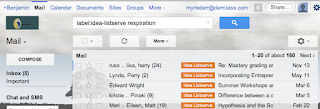
Using Gmail, I can easily find what I need.
For example, when I would need advice on how to teach respiration, I'd go to that folder and search for all emails containing the word "respiration". I'd always find some great advice or a worksheet someone was willing to share. Since it all came from teachers who actually used the material in the classroom, I could have confidence in the material.

Reacting to content

The next most common way teachers use the internet is to interact with others online. This means going to sites to get the answer to a question you have or perhaps to comment on what someone has written in a blog or post. These sorts of sites about and include Yahoo Answers, Linkedin, or one of the many other sites found here. Perhaps my favorite place to interact with teachers is Edumodo.

This is a free, secure online social network designed to look and feel just like Facebook. However, it has several security features built in to make it teacher and student friendly. For example, the site does not have the ability for students to communicate with the outside world (except for their own parents). Instead, they can only hear from and write to their teacher and classmates. Really the only people interested in joining Edmodo are teachers and their students. That makes this site the perfect place to go when you have a burning question or an issue you'd like some advice on. Oh ya, did I mention you don't HAVE to put in your actual name? Use a pseudonym if you want some extra privacy and don't plan on using it for your students.
Creating content

By far the most rewarding thing that you can do online is create content. This means publishing your ideas, writing articles and advising other teachers. Of course, this is going to be the most time consuming and will require far more effort on your part. The benefits are huge, though.  Giving over your ideas will tend to prompt others to give you their stuff. It becomes a virtuous circle. If you are going to be sharing your ideas, I would use Blogger, Diigo or Edmodo.

I've already spoken about Edmodo. Diigo is a social bookmarking site, allowing you to save and share websites you find interesting with groups of people. Blogger is, of course, where you can set up and write a blog. Any of these would be a fine choice. Really, whether you are just looking in and getting good ideas or helping others get advice for their classroom, try going social this year. You wont regret it. 
Really, whether you're just looking in and getting good ideas or helping others get advice for their own classroom, try going social this semester. You'll love the results!


12/26/2011

Gmail equals productivity

     One of the best ways to keep contact with parents, administration and parents is with email. That way, there is an indelible, time-stamped communication log to fall back on should there be any misunderstandings. Whenever possible, I always recommend using email as one of your primary communication tools.
     Unfortunately, email can be a hassle. I can get a few dozen per day myself. There are important one, interesting ones that you don't really need to read and the emails that are just kind of dead weight. It can be a hassle sorting through this constant electronic drizzle. Once you do sort through the emails you get, it can be difficult to find an email when you need it later on. Worse yet, if you store your email on a your computer, you could loose precious information. If you keep a copy of your emails on the local server, you run the risk going over your email quota.
     Gmail can solve all of these problems. You can have all of your email sent to Gmail (yes, any and all of your email accounts can easily be routed through Google) where it will be stored for free. You won't have to worry that you could loose important emails just because your laptop crashed. You also don't have to worry about going over your limit. I have 12,598 emails and my account is only 27% full (using 2078 MB of my allotted 7656 MB). That's huge! I don't have to take the time to sort through old emails, trying to decide if an email is worth keeping or not. With Gmail, I keep everything, knowing that I'll have an email if I ever need it again.
     Of course, that begs the question of search. In my sea of 13,000 emails, how could I possibly hope to find what I need in a timely mannor? Like most Google products (Google calendar being the most notable exception), search in Gmail is excellent. I can find most emails I need within 30 seconds. Obscure emails take a few minutes. However, I have never failed to find what I need.
     Want more information on how Gmail can improve your productivity? Tweet or email me.

11/26/2011

Education's changing role

William Butler Yeats said: "Education is not filling a bucket, but lighting a fire." That may be more true today than ever before.

The reason of course is the explosion of high quality, free lessons online. Nearly anything you want to learn is there waiting to be accessed by anyone with an interest in trying to absorb it. These aren't just courses by random bloggers, either. Stanford, Yale, Harvard, Berkeley and MIT all have classes available free to the general public. As repositories of knowledge, most of us are woefully outmatched.

Paradoxically, most students aren't sure how to leverage the internet to squeeze the greatest amount of good out of this endless bounty. That, I believe, is where we can serve as guides. By daily teaching critical thinking, study habits and organizational skills we can help students gain the mental agility to glean the fruits of the internet. Our role is changing from someone who helps build up a knowledge base to a trainer for thinking skills.