We do what we have always done because it works. And hey, why reinvent the wheel? Besides, we have so many things we have to get done that it's hard to find time to learn a new way of doing things. The thing is, it turns out that our ways are often inefficient or less productive than some alternatives.
With a new semester upon us, it may be time to try a few new tools. Below, I list some of my favorite online tools to improve teaching in the next 18 weeks. Give them a try. You may find yourself getting more done in less time, for free.
Google docs + Google calendars
I've written about this mash-up before. Google calendars is an easy to use schedule that you can work on at any time and on any computer that's handy. Calendars also has a nice feature that allows you to attach any file to an event as long as it is already in your Google docs account. That opens up the possibility of attaching lesson plans, tests and student samples. Since you can make any of those files private, you never have to worry about anyone else in the world seeing sensitive documents.
Edmodo
Students love social media for good reasons; it's fun, engaging and it makes learning easier. Unfortunately, there are so many dangers and pitfalls to using sites like Facebook or Twitter. The solution is a site designed specifically for educators to communicate with their students. Parents have full access to their own student's activities and teachers moderate all discussions. There is no outside communication and students don't have the option to talk to the outside world. Better yet, you can make self-grading quizzes and polls for free!
Desmos Graphing Calculator
Students are given all sorts of wonderful technology in schools. They are still being asked to buy expensive calculators. Finally here is a free online solution. Help kids learn to do math without expecting them to buy equipment.
Prezi
Perspective matters. Much of what we talk about in class deals with large scale vs. small scale. Consider these questions: What does a water molecule have to do with whether you have a desert or grassland? How did the Delaware river affect George Washington? What does the hight of a tree and the length of it's shadow have to do with a protractor you hold in your hand?
Prezi is an online presentation site that creates unique, beautiful presentations. Kids love them!
Educational Youtube
Finally! A way to get good educational videos at school! You don't have to worry about crude jokes or wardrobe malfunctions. Its all good stuff here. Well, that's mostly true. Unfortunately, suggestive videos are still sometimes suggested on the right hand side of the screen. You can't watch them, but the suggestive picture is there along with the provocative title. You'll just need to be a bit careful even when the video you want to watch is great.
Showing posts with label Calendars. Show all posts
Showing posts with label Calendars. Show all posts
1/02/2012


10/03/2011
Cirriculum mapping
Curriculum mapping is a powerful tool. It is a process of recording everything that is taught and assessed in order to improve instruction in a department. This can take some time, since each person in a given department has his or her own way structuring a class. In biology, for example, one teacher may want to start with chemistry and another prefers evolution. To add to this, there are different ways of scaffolding information and assessing what has been learned.
Google products can make this process more manageable.
In Google docs, all of your assessments from worksheets to tests can be stored and shared securely. By putting these documents online, other teachers can have access to your materials. Students can easily be blocked from seeing them however, making the system both secure and collaborative.
Google calendars increases selective collaboration even more. Here, you can enter the topic you are covering, the standard, performance indicator or essential question the topic covers. You can also attach any document you have in your Google docs account. Here's the really magical part of all this- it is secure!
If you only share your test with faculty members, then students cannot see it. However, any other teachers can take a look at what you're testing and adjust their teaching accordingly.
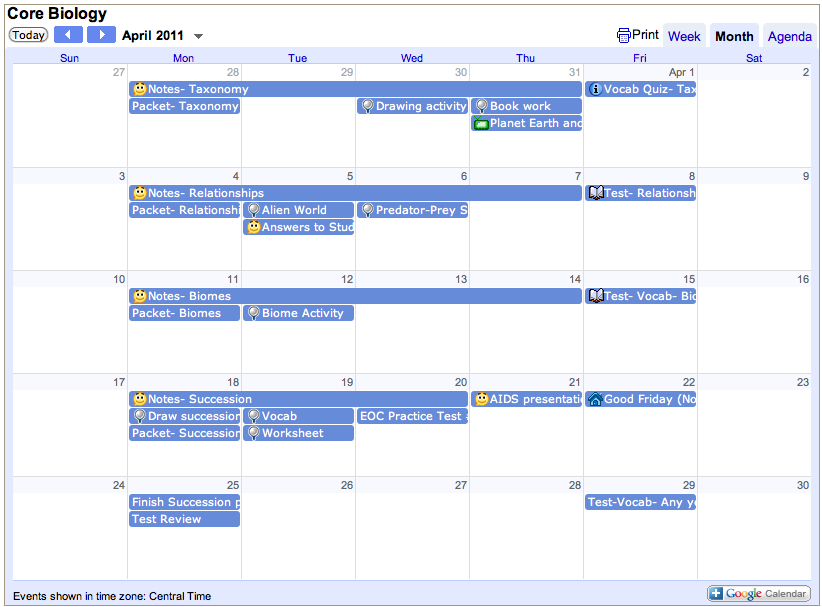
At the end of the year, when it comes time to map the curriculum, simply search for the standard, performance indicator or essential question. Every date in which the indicator was typed will show up instantly. Click on the date and the details of the entry appear. If you've attached a test or assignment stored in Google docs, you can share the material.
Using this method would not only benefit the department, but individual teachers. They would never have to wonder what they did last October. If they want to know how long they taught osmosis last year, they just look it up. Which handout went along with that lesson on rain forests? It's attached to the lesson.
Google docs combined with Google calendars is a powerful way to improve education.
Google products can make this process more manageable.
In Google docs, all of your assessments from worksheets to tests can be stored and shared securely. By putting these documents online, other teachers can have access to your materials. Students can easily be blocked from seeing them however, making the system both secure and collaborative.
If you only share your test with faculty members, then students cannot see it. However, any other teachers can take a look at what you're testing and adjust their teaching accordingly.
At the end of the year, when it comes time to map the curriculum, simply search for the standard, performance indicator or essential question. Every date in which the indicator was typed will show up instantly. Click on the date and the details of the entry appear. If you've attached a test or assignment stored in Google docs, you can share the material.
Using this method would not only benefit the department, but individual teachers. They would never have to wonder what they did last October. If they want to know how long they taught osmosis last year, they just look it up. Which handout went along with that lesson on rain forests? It's attached to the lesson.
Google docs combined with Google calendars is a powerful way to improve education.
Subscribe to:
Posts (Atom)