Showing posts with label elearning. Show all posts

5/05/2013

Interactive tutorials with Google

Google presentations are great for a lot of reasons. Unfortunately, they are designed to go from one slide to the next in a simple, linear fashion. There’s a way to make them interactive. This post tells you how to do just that.


Short instructions:
1) Create a presentation.
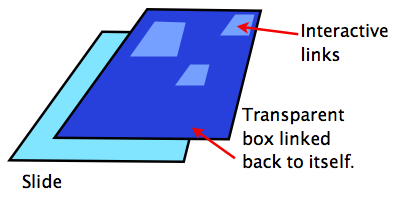
2) Completely cover each slide with a transparent box.
3) Link that box to the same slide on which it was placed.
4) Add small transparent boxes over the portions that will make your "buttons" interactive.


Long instructions:


Create your slides
First create the entire tutorial minus the interaction. This includes any interactive buttons or clickable objects. Also, make sure you add any animations or slide transitions before moving on to step two. I'll explain why latter. I suggest making the tutorial in something like Powerpoint first, then copying it over to Google Docs. Powerpoint is far easier to work with. You’ll be better able to concentrate on architecture of the tutorial and be able to troubleshoot with less hassle. Google Docs will convert Powerpoints into a Google presentation, so there really isn’t much more work creating the tutorial in a separate program.


Once the tutorial has been created, uploaded and converted, it’s time to add the magic. First, we have to remove a feature that Google built into presentations. Normally, when you click on a slide it will automatically move to the next slide. You can stop that from happening by covering the entire slide with a transparent box.

Cover each slide
Add the box by clicking on “Insert”, then “Shapes”, then choose the square. You'll get a pair of cross hairs that you can use to draw whatever size square you choose. Start drawing just outside the slide, then click and drag to create a shape large enough to extend beyond the borders of the slide. Next, change the fill to transparent. Leave the line. This makes the box easy to for you see and since the box is outside the boundries of the actual slide, no one else will notice them. Now, click on that box, then click on the link button. One of your options will be to link to a specific slide. Choose the slide you are currently on. That way, when someone clicks anywhere on the slide, they'll stay on that slide and won't be able to move forward. You'll be giving them a way to move around in a moment. For now, you just need to prevent them from pushing forward every time they click on a slide.

Add invisible, linked squares
Finally,you’ll need to add the interactivity. Remember that you've already created the tutorial. All you're doing at this point is making your buttons and other clickable objects work. Once again, you'll need to create a transparent box and link it to a slide. This time, however you'll be linking to a slide
further along in your presentation.

In my example presentation, you'll see a "Next" button. I've covered that button with a transparent box that is hyperlinked to the next slide. When someone tries to click "Next", they'll actually click on my transparent box and be sent to the next slide in the tutorial.

Copy and paste is your friend here. For buttons like Next, Previous, Home and Exit, the transparent boxes will all be the same size and placed in same area on each slide. Once you have the boxes created for one slide, select all of the blocks (ctrl + click) then copy them all. Now all you have to do is go down from slide to slide hitting ctrl +v, pasting those boxes into position.

Publish or share
Don't forget that when you're all done, you need to change the privacy settings in your presentation to allow others to see what you've wrought. Below, I have an example of an very short interactive tutorial. It will give you an idea of what you can create.


1/22/2012

Learn anything...really?

There is a flurry of competition in the arena of free online education. Major universities have put classes online for free. There are dozens free books, movies and courses available from Openclass. Site like HTMLGoodies is a great place to learn how to work with computers. Lets not forget about Khan Academy. The most recent news story is about Apple's push into education via iBooks2, iTunesU and iAuthor. All of this provides the world with an (up till now) unbelievable amount of free, authoritative, trustworthy and understandable education.

Can we now expect droves of people flocking to public libraries and hunching over cell phones in hopes of improving their lot in life by improving their minds? Maybe. I'm reminded of Thomas Paine when he said “What we obtain too cheap, we esteem too lightly."  Free public education is esteemed so lightly that laws are in place to force students to attend classes. Libraries have long held texts filled with information the general public could use to educate themselves. So far, few people have taken full advantage of these resources.

Thankfully, there are some distinct differences between past attempts at providing free learning and what is going on now. Free public education has been run on a strict schedule and in a defined location where students are forced to associate with people they dislike and sometimes fear or hate. Now, the learning can happen whenever it is convenient and wherever students are most comfortable. There is no need to sit next to a bully or sit quiet and still for an hour or more. Furthermore, students can access courses that are most relavent to their lives. Perhaps the most important aspect of online learning is that it can be as minute as looking up proper spelling to being as in depth as learning basic Spanish. And all of it is nearly instantaneous.

Libraries have had their own barriers.  Like all buildings, they have a specified schedule and are located in a specific place. If you have a hard time getting to that place at the specified time, you're out of luck. Perhaps two of the least obvious roadblocks were literacy and (more often than not) sight. Youtube and recorded lecture/ podcasting has drastically reduced that barrier.  

More and more, the internet is becoming a place of astounding resources for improving people's lives. God willing, the trend will continue.

1/02/2012

On Tradition

We do what we have always done because it works. And hey, why reinvent the wheel? Besides, we have so many things we have to get done that it's hard to find time to learn a new way of doing things. The thing is, it turns out that our ways are often inefficient or less productive than some alternatives.

With a new semester upon us, it may be time to try a few new tools. Below, I list some of my favorite online tools to improve teaching in the next 18 weeks. Give them a try. You may find yourself getting more done in less time, for free.

Google docs + Google calendars
I've written about this mash-up before. Google calendars is an easy to use schedule that you can work on at any time and on any computer that's handy. Calendars also has a nice feature that allows you to attach any file to an event as long as it is already in your Google docs account. That opens up the possibility of attaching lesson plans, tests and student samples. Since you can make any of those files private, you never have to worry about anyone else in the world seeing sensitive documents.

Edmodo
Students love social media for good reasons; it's fun, engaging and it makes learning easier. Unfortunately, there are so many dangers and pitfalls to using sites like Facebook or Twitter. The solution is a site designed specifically for educators to communicate with their students. Parents have full access to their own student's activities and teachers moderate all discussions. There is no outside communication and students don't have the option to talk to the outside world. Better yet, you can make self-grading quizzes and polls for free!


Desmos Graphing Calculator
Students are given all sorts of wonderful technology in schools. They are still being asked to buy expensive calculators. Finally here is a free online solution. Help kids learn to do math without expecting them to buy equipment.

Prezi
Perspective matters. Much of what we talk about in class deals with large scale vs. small scale. Consider these questions: What does a water molecule have to do with whether you have a desert or grassland? How did the Delaware river affect George Washington? What does the hight of a tree and the length of it's shadow have to do with a protractor you hold in your hand?
Prezi is an online presentation site that creates unique, beautiful presentations. Kids love them!

Educational Youtube
Finally! A way to get good educational videos at school! You don't have to worry about crude jokes or wardrobe malfunctions. Its all good stuff here. Well, that's mostly true. Unfortunately, suggestive videos are still sometimes suggested on the right hand side of the screen. You can't watch them, but the suggestive picture is there along with the provocative title. You'll just need to be a bit careful even when the video you want to watch is great.


11/26/2011

Education's changing role

William Butler Yeats said: "Education is not filling a bucket, but lighting a fire." That may be more true today than ever before.

The reason of course is the explosion of high quality, free lessons online. Nearly anything you want to learn is there waiting to be accessed by anyone with an interest in trying to absorb it. These aren't just courses by random bloggers, either. Stanford, Yale, Harvard, Berkeley and MIT all have classes available free to the general public. As repositories of knowledge, most of us are woefully outmatched.

Paradoxically, most students aren't sure how to leverage the internet to squeeze the greatest amount of good out of this endless bounty. That, I believe, is where we can serve as guides. By daily teaching critical thinking, study habits and organizational skills we can help students gain the mental agility to glean the fruits of the internet. Our role is changing from someone who helps build up a knowledge base to a trainer for thinking skills.